THINKWARE DASH CAM LINK
THINKWAREAuto & Vehicles
3.3262.00 Reviews
- Version
- 1.5.21
- Installs
- 500.00K
- Age Rating
- Everyone
Screenshots
Our Review of THINKWARE DASH CAM LINK
 Analysis by Appyee
When a dash cam is already mounted in your car, the most useful companion is often not another general driving app, but a tool that lets you check what the camera actually saw. That is where THINKWARE DASH CAM LINK makes sense. Developed by THINKWARE, this free Auto & Vehicles app connects the viewing side of a compatible THINKWARE dash cam with your mobile device, giving you a practical way to inspect live images and recorded video without treating the camera itself as the entire workflow.
My overall view is straightforward: this is a focused utility rather than a complete driving assistant. It is valuable when you need to verify the camera’s view, review an incident, or check footage while standing beside the vehicle. It is less appealing if you want route planning, cloud-based video management, or a dash-cam system that works independently of a particular brand. The app does one central job, and its usefulness depends heavily on how often you need that job.
What the app is really useful for
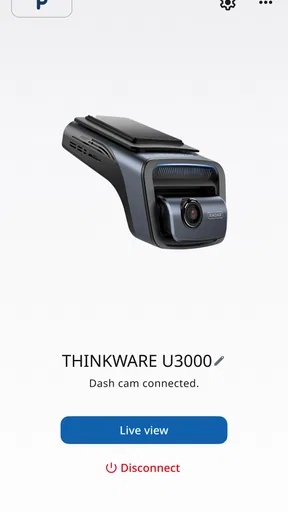
The first thing I noticed about this kind of companion app is that it changes the dash cam from a device you install and forget into something you can inspect when necessary. With THINKWARE DASH CAM LINK, the phone becomes the more convenient screen for viewing the camera’s live image and recorded clips. That matters because the camera is usually positioned high on the windshield, where its own display, controls, or physical access may be awkward while the car is parked.
A live view is particularly helpful during installation or after moving the camera. I would use it to check whether the horizon is level, whether the road occupies the right part of the frame, and whether an obstruction such as a mirror edge, sticker, or sun visor has entered the picture. This is a small task, but it can prevent a much larger disappointment later. A dash cam can be recording regularly and still be aimed too high or too low to capture the useful part of the road.
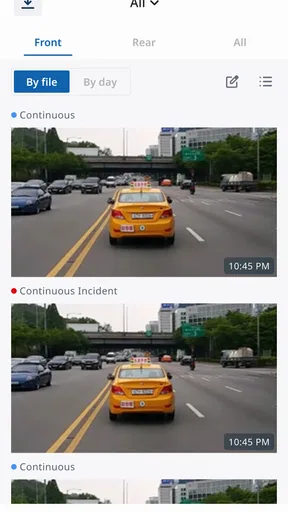
The recorded-video side is the stronger everyday reason to keep the app installed. If something happens in traffic, reviewing the clip on a phone is more comfortable than trying to operate the camera from the driver’s seat or remove storage media immediately. I would always do this while parked, but the basic workflow is clear: connect to the camera, locate the relevant recording, and inspect what happened from the camera’s perspective.
The practical advantage is convenience at the moment evidence matters. You do not need to rely only on a tiny camera screen or wait until you are back at a computer. That makes the app useful after a minor collision, a sudden braking event, a disputed parking incident, or even a situation where you simply want to confirm whether a plate or road sign was visible.
Checking footage without turning it into a chore
Video review is not only about dramatic incidents. I can imagine using the app after returning to a parked car and noticing a new mark on the bumper. Instead of guessing when it happened, I could inspect the relevant recordings and look for movement around the vehicle. The app does not magically solve the investigation, but having a more accessible viewing route makes the first step much easier.
There is also a useful distinction between checking a live image and reviewing a recording. Live view helps with setup and immediate confirmation. Recorded video helps with evidence and retrospective checking. Keeping those purposes separate makes the app easier to judge: it is not trying to replace a navigation app or become a social driving platform. It is a bridge between the dash cam and the person who needs to see its output.
For owners who rarely touch their dash cam, this can also be a confidence check. After changing the windshield, adjusting the camera mount, or cleaning the glass, opening the live image gives a quick way to confirm that the camera still sees the road properly. That is more useful than discovering a problem only after an incident.
The connection is part of the experience
The app’s usefulness naturally depends on the connection between the phone and the compatible THINKWARE camera. I would treat that as a short, deliberate session rather than something intended to run continuously in the background. Park first, open the app when you need it, review or check the image, and close the session when finished. That approach is safer and usually less frustrating than trying to interact with footage while driving.
A good habit is to make the first connection at home or in a quiet parking area, not beside a busy road after an incident. This gives you time to understand how the app reaches the camera and where recordings appear. It also lets you discover whether the phone needs to change its connection behavior during the session. Preparing before an emergency is one of the most useful things an owner can do with a companion app.
I would also avoid assuming that a live image is a substitute for a final recording. Live viewing is excellent for checking framing, but when an event matters, the recorded clip is the item to preserve and inspect carefully. If you need to show footage to an insurer, police officer, or another driver, review the original recording and keep the relevant file intact rather than relying only on a preview.
Small workflow choices that make a difference
One non-obvious strength of this app is that it encourages better dash-cam maintenance. I would use it after installing the camera, after changing the mounting position, and after cleaning the windshield in front of the lens. These checks take little time and can reveal a shifted angle or a blocked view before it becomes important.
A second useful workflow is to review a clip immediately after a confusing road event, while the sequence is still easy to identify. Waiting and searching later can make the process slower, especially when several drives have been recorded. If the app makes that review accessible from the phone, it turns a vague memory into a more orderly check of what actually happened.
A third trade-off concerns phone storage and sharing habits. Viewing footage on a mobile device is convenient, but I would not automatically keep every clip on the phone. Save only the recordings you genuinely need, label them in a way that makes sense to you, and avoid editing the original if the video may become evidence. The app is most effective when it is part of a careful review process, not when it becomes an uncontrolled dumping ground for recordings.
Where it falls short and who should use it
I’d use this section to weigh the app’s focused role against the extra steps that can come with connecting a phone to a dash cam. It should help readers decide whether occasional footage checks are worth that small workflow, or whether a camera maker’s broader tools or a more general video setup would suit them better. The key is matching the app to the way you actually use your camera.
A focused companion, not a complete driving platform
The app’s narrow purpose is both its appeal and its main limitation. It is built around THINKWARE dash-cam viewing, so someone looking for a broad driving toolkit will probably find it limited. There is no reason to install it expecting navigation, fuel tracking, parking discovery, trip statistics, or a general-purpose camera system. Those needs belong to other apps or to the dash cam’s wider ecosystem.
This also means that the app is not an obvious choice for people who do not own a compatible THINKWARE dash cam. The free price is welcome, but free does not mean universally useful. Its value comes from pairing it with the right hardware. If your camera is from another manufacturer, a brand-neutral video workflow or that manufacturer’s own companion app may be a better fit.
Another limitation is that a phone connection can add friction at exactly the time you want simplicity. You may need to park, establish the connection, wait for the camera and phone to communicate, and then locate the relevant recording. That is still more convenient than removing storage media in many situations, but it is not as immediate as opening a video that is already on the phone.
For that reason, I would not recommend relying on the app as the only part of an evidence routine. Important footage should be backed up through a sensible personal workflow after you have identified it. The app helps you reach the recording; it does not remove the need for judgment about preserving, organizing, and sharing it responsibly.
What the public response suggests
The app has an average rating of 3.3 from around 1.6 thousand ratings, with more than 260 written reviews. I read that as a mixed but understandable signal. A companion app can be judged not only on its interface, but also on the quality of the connection, the specific camera model, the phone being used, and the user’s expectations about transferring video. A person who only needs occasional viewing may be satisfied, while someone expecting a polished remote camera system may be more critical.
Its reach is still meaningful: the app has passed 500 thousand installs. That suggests it is not an obscure experiment, but the install count should not be confused with a promise that every setup will feel identical. Dash-cam accessories often work best when the owner follows a consistent connection and review routine rather than treating the app like a normal always-online mobile service.
Who will get the most from it
I would recommend it first to THINKWARE owners who want a convenient way to inspect live framing and retrieve recordings while near the car. It is especially suitable for drivers who prefer using a phone screen instead of handling the camera directly, and for anyone who wants a straightforward way to investigate an incident before deciding what to do next.
It also suits people who periodically check their equipment. If you are the kind of driver who cleans the windshield, verifies the mount, and reviews important recordings rather than assuming everything worked, the app adds a practical layer of control. The Everyone content rating also makes it broadly approachable as a utility, although safe use still means interacting with it only when parked.
I would skip it if you expect a dash-cam app to manage every part of driving life. It is not the right choice for someone who wants live remote surveillance from anywhere, a navigation replacement, or a multi-brand camera dashboard. In those cases, a different category of tool will serve you better. I would also be cautious if your main priority is effortless automatic backup, because this app is centered on viewing the camera rather than replacing a full video-archiving system.
Compatibility and installation expectations
THINKWARE lists the app as free, with a minimum operating-system requirement of Android 9. That makes checking the phone’s software version worthwhile before installation. The current version is 1.5.21, and the app was released on March 25, 2020, so it has had time to establish itself as a continuing companion rather than a newly launched utility.
Still, the most important compatibility question is not simply whether the phone can install it. The camera must also be part of the supported THINKWARE setup. I would confirm the exact camera model and follow its connection instructions before depending on the app for an important trip. This is a better approach than installing it after an incident and discovering that the hardware relationship is not what you expected.
Once installed, I would spend a few minutes testing three things while parked: whether live view opens, whether an existing recording can be found, and whether the phone can handle a short review without losing the connection. That simple test answers the questions that matter in daily use. It also provides a chance to learn the interface before stress makes every extra step feel complicated.
My verdict for everyday ownership
THINKWARE DASH CAM LINK is best understood as a useful viewing companion, not as a reason by itself to buy into a complete dash-cam system. Its strongest contribution is practical: it makes the camera’s live image and recordings easier to inspect from a phone. That can save time during setup and reduce hassle when a road or parking incident needs closer attention.
The weaknesses are equally clear. The experience depends on compatible THINKWARE hardware, the connection process may not feel instant, and the app does not replace navigation, automatic archiving, or a broader driving assistant. Anyone expecting those functions should look elsewhere rather than blaming a focused utility for not being something different.
For the right owner, though, the free download is easy to justify. I would keep it installed with a compatible THINKWARE dash cam, test it before I need it, and use it as part of a careful footage-review routine. If your priority is seeing what your dash cam recorded without reaching for a computer, this app earns its place; if you want an all-purpose driving app, it is too specialized.
Verdict
Strengths of THINKWARE DASH CAM LINK
- Live video preview helps position the camera and check framing.
- Wireless access lets you review clips without removing the memory card.
- Event footage can be downloaded directly to a compatible smartphone.
- Camera settings are easier to manage from the mobile interface.
- Useful for checking recorded evidence after an incident on the road.
Limitations of THINKWARE DASH CAM LINK
- Requires a compatible THINKWARE dash cam to function properly.
- Wi-Fi connection may interrupt other internet activity on your phone.
- Large video files can take considerable time to transfer.
- Some features may vary depending on the dash cam model and firmware.
- Background use can increase battery consumption on both devices.
Similar Picks in This Category
View All
Android Auto
Google LLC4.1

maxim — order a taxi & food
PT. SITO4.7

Штрафы ГИБДД: проверка с фото
Pays LLC – Штрафы ГИБДД4.7

Номерограм – проверка авто
Авто Ассист4.8

Дром Авто
Дром4.9

Frequently Asked Questions
What is THINKWARE DASH CAM LINK used for?
THINKWARE DASH CAM LINK is the companion mobile app for compatible THINKWARE dash cameras. After connecting your phone to the camera’s Wi-Fi network, you can preview the live recording, browse saved videos and photos, download important clips, and adjust supported camera settings without removing the memory card. It is mainly designed to make dash-cam footage easier to manage directly from Android or iOS.
How do I connect the app to my THINKWARE dash cam?
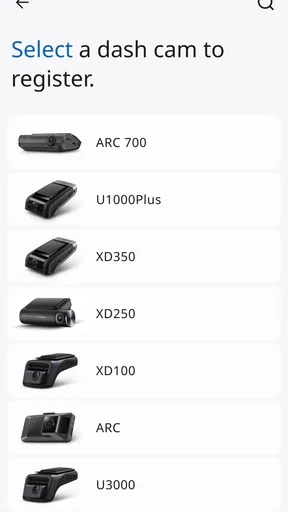
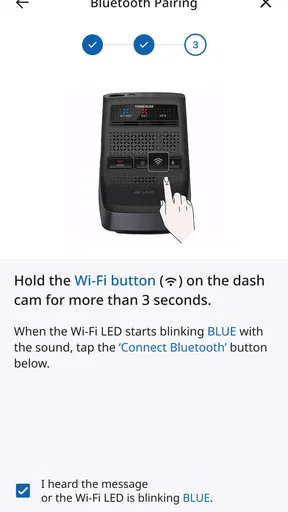
To connect, turn on the compatible THINKWARE dash cam and enable its Wi-Fi or mobile connection feature. Open DASH CAM LINK, follow the pairing instructions, and connect your phone to the dash cam’s wireless network when requested. Your phone may temporarily lose access to normal internet service during this process, which is expected. Compatibility and connection steps can vary by camera model and firmware version.
Can I watch and download recorded videos with DASH CAM LINK?
Yes, the app lets you browse recordings stored on the dash cam’s memory card and play supported files on your phone. You can usually download selected videos for sharing, backup, or insurance purposes. Large, high-resolution recordings may take some time to transfer, especially over a wireless connection, so keeping the phone close to the camera and ensuring sufficient storage can improve the experience.
Does THINKWARE DASH CAM LINK work with every THINKWARE camera?
No. DASH CAM LINK is intended for selected THINKWARE dash-cam models, and available features may differ between devices. Before downloading, check the app’s official store listing and THINKWARE’s compatibility information for your exact camera model, region, and firmware. Some older cameras may require a different companion application, while certain functions may only be available on newer or supported products.
Why is the app unable to connect or showing missing videos?
Connection problems can result from an incompatible camera, outdated firmware, disabled Wi-Fi, another device already connected to the dash cam, or phone settings that restrict local-network access. Try restarting both devices, reconnecting to the camera’s Wi-Fi, updating the app and camera firmware, and granting the requested permissions. If recordings are missing, verify that the memory card is inserted correctly and readable by the camera.
